Author: r55nwtm6g4lm

  • html2pdf-go

    html2pdf-go

    A simple Go package for converting HTML content to PDF using the chromedp package under the hood. The package supports concurrent PDF generation through a worker pool system.

    Features

    • Concurrent HTML to PDF conversion using Chrome/Chromium
    • Configurable worker pool size
    • Customizable PDF output settings (page size, margins, etc.)
    • Support for waiting for page load and animations
    • Automatic retry mechanism for failed conversions
    • Debug logging option
    • Resource cleanup with graceful shutdown

    Installation

    go get github.com/xarunoba/html2pdf-go

    Ensure you have Chrome or Chromium installed on your system.

    Usage

    Basic Usage

    package main
    
    import (
        "context"
        "log"
        "os"
    
        "github.com/xarunoba/html2pdf-go"
    )
    
    func main() {
        // Create a new converter with default options
        converter, err := html2pdf.New()
        if err != nil {
            log.Fatal(err)
        }
        defer converter.Close()
    
        // HTML content to convert
        html := `
            <!DOCTYPE html>
            <html>
                <body>
                    <h1>Hello, World!</h1>
                </body>
            </html>
        `
    
        // Convert HTML to PDF
        ctx := context.Background()
        pdf, err := converter.Convert(ctx, html)
        if err != nil {
            log.Fatal(err)
        }
    
        // Save the PDF
        if err := os.WriteFile("output.pdf", pdf, 0644); err != nil {
            log.Fatal(err)
        }
    }

    For more usage examples, please check the examples directory.

    Configuration Options

    Converter Options

    Option Description Default
    WithWorkers Number of concurrent Chrome tabs 1
    WithTimeout Maximum time for conversion 60 seconds
    WithRetryAttempts Number of retry attempts 3
    WithRetryDelay Delay between retries 1 second
    WithDebug Enable debug logging false

    PDF Options

    Option Description Default
    WithPaperSize Page width and height (inches) 8.5 x 11
    WithMargins Page margins (inches) 0.5 all sides
    WithWaitForLoad Wait for page to load true
    WithWaitForAnimations Animation completion wait time 500ms
    WithWaitTimeout Maximum wait time 60s

    Considerations

    • This package uses Chrome/Chromium for PDF generation, which provides excellent CSS support and rendering accuracy but may not be the fastest solution for high-volume processing.
    • Memory usage scales with the number of workers, as each worker maintains a Chrome tab.
    • Performance can vary based on system resources, document complexity, and whether the HTML contains external resources.
    • For production environments, consider running benchmarks to determine optimal worker pool size for your use case.

    Requirements

    • Go 1.23 or later
    • Chrome or Chromium browser installed on the system

    Visit original content creator repository

  • Progress-Sheet


    Daily Progress Log

    Sad_Cat

    chart


    March 14, 2023

    Activity Time Spent Things Learned Problem Faced
    Problem Solving 3 hrs
    • Reminiscing Stl
    • Time Complexity
    • Comparator Sort
    • 2 Problems from Atcoder
    • 1 Problem from Codeforces
    Andrew Ng 0.72 hrs
    • Simplified Loss Function for Logistic Regression
    • Simplified Cost Function
    • Implementation of Cost & Loss Function

    Goals for Tomorrow

    • Start Student Performance Project ASAP
    • Stop being a lazy cunt


    March 13, 2023

    Activity Time Spent Things Learned Problem Faced
    Problem Solving 3.4 hrs
    • 3 Problems from Codeforces

      Goals for Tomorrow

      • Start Student Performance Project
      • Finish 3 Andrew Ng videos


      March 12, 2023

      Activity Time Spent Things Learned Problem Faced
      Problem Solving 3.2 hrs
      • 4 Problems from Codeforces

        Goals for Tomorrow

        • Start Student Performance Project
        • Problem solving for at least 3 hrs
        • Finish 3 Andrew Ng videos


        March 11, 2023

        Activity Time Spent Things Learned Problem Faced
        Andrew Ng 1.3 hrs
        • Cost Function for Logistic Regression
        • Logistic Loss Function
        • Reason the squared error loss is not appropriate for logistic regression
          • Logistic loss function

          Goals for Tomorrow

          • Spend at least 3 hrs on problem solving
          • Start student performance project


          March 10, 2023

          Activity Time Spent Things Learned Problem Faced
          Andrew Ng 1.4 hrs
          • Decision Boundary
          • Threshold
          • Decision Boundary Line
          • Non Linear Decision Boundary
          • Plot the decision boundary for a logistic regression model

            Goals for Tomorrow

            • Start doing Student Performance project
            • Follow mentors guideline


            March 9, 2023

            Activity Time Spent Things Learned Problem Faced
            Andrew Ng 2.6 hrs
            • Assignment on implementating Linear Regression (univariate)
            • Introduction to Classification
            • Binary Classification
            • Sigmoid Function / Logistic Function
            • Logistic Regression
            • Interpretation of Logistic Regression
            • Implementating Logistic Regression Model using Linear Regressin & Sigmoid Function
            • np_c function

              Goals for Tomorrow

              • Wake up at 7 am
              • Do more activities
              • Looking for more Projects to do
              • Explore how Chess can be played using ML


              March 8, 2023

              Activity Time Spent Things Learned Problem Faced
              Machine Learning Project 4.3 hrs
              • House Price Preditction 3
              • Feature Scaling with Z-score Normalization
              • Relation between Features and Targets
              • Linear Regression using Scikit-Learn
              • Cost comparison between Scratch implementation vs Sk-learn’s LinearRegression model
                • Implemented function and Scikit-Learn’s Linear model’s overall cost is pretty similar. But both have huge total cost.
                Andrew Ng 1.5 hrs
                • Feature Engineering
                • Using Intution to design new features out of originals
                • Polynomial Regression
                • Importance of feature scaling in Feature Engineering
                  • Feature Engineering Lab implementation went over my head

                  Goals for Tomorrow

                  • Start the week 3 of Andrew Ng
                  • Refine the project a little bit.


                  March 7, 2023

                  Activity Time Spent Things Learned Problem Faced
                  Andrew Ng 1.5 hrs
                  • Run Gradient Descent on a data set with multiple Features
                  • Explore the impact of the Learning Rate (alpha)
                  • Feature Scaling using Z-score Normalization

                    Goals for Tomorrow

                    • Complete the House Price Prediction project and adding context to it


                    March 6, 2023

                    Activity Time Spent Things Learned Problem Faced
                    Machine Learing Project 1.8 hrs
                    • House Price Prediction 2
                    • Normalization by dividing Max on Train & Test data
                    • Dropping (deleting) data rows consisting null values
                    • Learning Rate tweaking for best outcome
                    • Plotting the convergence of Cost Function
                    • Cost computing on Test data
                    • Debugging Multiple Linear Regression
                      • Normalized both inputs and targets to reduce the cost
                      Mid Preparation

                      Goals for Tomorrow

                      • Getting over with the exam and resume the projec


                      March 5, 2023

                      Activity Time Spent Things Learned Problem Faced
                      Mid Preparation

                      Goals for Tomorrow

                      • Getting over with the exam and resume the project


                      March 4, 2023

                      Activity Time Spent Things Learned Problem Faced
                      Andrew Ng 1.6 hrs
                      • Feature Scaling
                      • Importance of Feature Scaling
                      • Divide by Maximum scaling
                      • Mean Normalization
                      • Z-Score Normalizaion
                      • Standard Deviation
                      • Acceptable Feature value ranges
                      • Check Gradient Descent for Converge
                      • Autometic Converge test
                      • When to Declare Convergence
                      • Choosing the Learning Rate
                      • Identify the problems with Gradient Descent
                      • Debugging Gradient Descent
                        Mid Preparation

                        Goals for Tomorrow

                        • Continue Mid & Progress as much as I can.


                        March 3, 2023

                        Activity Time Spent Things Learned Problem Faced
                        Mid Preparation

                        Goals for Tomorrow

                        • Continue Mid & Progress as much as I can.


                        March 2, 2023

                        Activity Time Spent Things Learned Problem Faced
                        Machine Learning Project 2.7 hrs
                        • House Price Prediction part 1
                        • Missing / null value Checking
                        • Replacing missing values with Mean
                        • Gradient Function Implementation
                        • Gradient Descent Implementation
                        • Multiple Linear Regression
                          • Learning Rate issue
                          • Predicted price is not even close
                          • Accuracy_score function not working

                          Goals for Tomorrow

                          • Continue Mid & Progress as much as I can.


                          March 1, 2023

                          Activity Time Spent Things Learned Problem Faced
                          Andrew Ng 2.5 hrs
                          • Reminiscing previous Labs & Quiz
                          • Gradient Descent for more than one Features
                          • An alternative to Gradient Descent, Normal Euation Method
                          • Cost Computing for Multiple Variables
                          • Implementation of Multiple Linear Regression
                            • Predicted cost of the model is yet to be efficient
                            Mid Preparation

                            Goals for Tomorrow

                            • Continue Mid & Progress as much as I can.


                            February 28, 2023

                            Activity Time Spent Things Learned Problem Faced
                            Progress Sheet 0.6 hrs
                            • Extract total time spent over different topic using Formulas
                            • Inserting Charts inside google sheets
                            Andrew Ng 1.6 hrs
                            • Vectorization
                            • NumPy For Vectorization
                            • Vectors
                            • Dot Product using NumPy
                            • Vectorization vs For Loop (Speed Test)
                            • Matrix Indexing & Slicing
                            Mid Preparation

                            Goals for Tomorrow

                            • Continue Mid & Progress as much as I can.


                            February 27, 2023

                            Activity Time Spent Things Learned Problem Faced
                            Andrew Ng 1.1 hrs
                            • Cost Function Implementation
                            • Gradient Descent Implementation for one Featur
                            • Multiple Linear Regression / Linear Regression with Multiple Features

                            Goals for Tomorrow

                            • Continue Mid & Progress as much as I can.
                            • Finish vectorization & Gradient Descent for Multiple Linear Regression.


                            February 26, 2023

                            Activity Time Spent Things Learned Problem Faced
                            Mid Preparation

                            Goals for Tomorrow

                            • Continue Mid & Progress as much as I can.


                            February 24, 2023

                            Activity Time Spent Things Learned Problem Faced
                            Model Deployment 2 hrs
                            • Introduction to the Deployment of Machine Learning Model
                            • Exporting the Model from Jupyter Notebook as .pkl file
                            • Deploy it on Local Machine
                            • Deploying a Model on GitHub Pages
                            Mid Preparation

                            Goals for Tomorrow

                            • Continue Mid & Progress as much as I can.

                            February 24, 2023

                            Activity Time Spent Things Learned Problem Faced
                            Mid Preparation

                            Goals for Tomorrow

                            • Continue Mid & Progress as much as I can.


                            February 23, 2023

                            Activity Time Spent Things Learned Problem Faced
                            Andrew Ng 1.2 hrs
                            • Gradient Descent Intuition
                            • Learning Rate
                            • Choosing better Learning Rate
                            • Local Minimum
                            • Global Minimum
                            • Reaching Local Minimum
                            • Convex Function
                            Mid Preparation

                            Goals for Tomorrow

                            • Continue Mid & Progress as much as I can.


                            February 22, 2023

                            Activity Time Spent Things Learned Problem Faced
                            Andrew Ng 2.4 hrs
                            • Cost Function models in 3d
                            • Contour Plot of Cost Function
                            • Finding Minimum value of cost function
                            • Inital guess effect of the parameters of the cost function

                            Goals for Tomorrow

                            • Simply avoid Phone
                            • Start Module 2 of Andrew Ng and go through it fast


                            February 21, 2023

                            Activity Time Spent Things Learned Problem Faced
                            Machine Learning Project 1.4 hrs
                            • Rock vs Mine Prediction part 2
                            • Train and Test data splitting
                            • Training LogisticRegression Model
                            • Checking a Model’s accuracy
                            • Making of a Predictive System
                            • Logictic Regression Model Theory
                            Mid Preparation

                            Goals for Tomorrow

                            • Finish the Module 1 of Andrew Ng
                            • Explore beginner projects to do later


                            February 20, 2023

                            Activity Time Spent Things Learned Problem Faced
                            Python Data-camp 1.4 hrs
                            • Pandas
                            • DataFrame
                            • CSV File reading
                            • loc
                            • iloc
                            Machine Learning Project 0.75 hrs
                            • Rock vs Mine Prediction
                            • Working with Big Datasets

                            Goals for Tomorrow

                            • Resume Python Data-camp
                            • Resume Rock vs Mine Project
                            • Finish the first week of Andrew Ng


                            February 19, 2023

                            Activity Time Spent Things Learned Problem Faced
                            Andrew Ng 1.7 hrs
                            • Cost Function
                            • Squared Error Cost Function
                            • Const Function Intuition

                            Goals for Tomorrow

                            • Use less time lying around
                            • Starting Khanacademy because I am falling behind
                            • Do more data-camp


                            February 18, 2023

                            Activity Time Spent Things Learned Problem Faced
                            Machine Learning Project 5.8 hrs
                            • Line that is supposed to go through the points doesn’t seem right

                            Goals for Tomorrow

                            • Beautify the project with details about Linear Regression theory
                            • Spend less time on a project
                            • Use time efficiently
                            • Starting Khanacademy


                            February 17, 2023

                            Activity Time Spent Things Learned Problem Faced
                            Python Data-camp 1.4 hrs
                            Andrew Ng 2.3 hrs
                            • Linear regression model training and estimated target

                            Goals for Tomorrow

                            • Understanding Model representation lab, eventually disscuss it with Safaet
                            • Start linear algebra from Kahanacademy
                            • Start Panda package tutorial


                            February 16, 2023

                            Activity Time Spent Things Learned Problem Faced
                            Progress Sheet 2 hrs
                            • Add to do list
                            • How to add same formula to the whole column
                            Git 2.1 hrs
                            • Reminiscing Git
                            • How to work in an existing git repository
                            • What happens if I change the location of a folder
                            Andrew Ng 1 hrs
                            • Linear regression
                            • Clustering Algorithm
                            • Anomaly Detection
                            • Dimentionality Detection
                            • Notations

                            Goals for Tomorrow

                            • Waste less time on the phone
                            • Recapture the git a little more
                            • Implement linear regression in Jupyter Notebook


                            Overall Learned

                            Programming

                            • Python
                              • Introduction to Python
                              • NumPy
                              • Matplotlib
                              • Pandas
                            • Markdown

                            Algorithm

                            • Supervised Machine Learing
                              • Regression
                                • Linear Regression
                                  • For Single Variable (Univariate)
                                  • Multiple Features
                              • Classification
                                • Logistic Regression
                            • Unsupervised Machine Learning
                              • Clustering
                              • Anomaly Detection
                              • Dimentionality
                            • Gradient Descent

                            Projects

                            • Student Score Prediction using Linear Regression (Univariate)
                            • Rock vs Mine Prediction using Logistic Regression

                            Deployment of Machine Learning Model

                            Visit original content creator repository
                          • T6.1-tropical-glaciers-suitability-model

                            T6.1-tropical-glaciers – Environmental suitability model

                            Tropical Glacier Ecosystems are facing extreme pressure due to climate change and face imminent collapse in this century.

                            We explore here future projections of one direct and one indirect indicator of key ecosystem properties and use these to explore the probable trajectories toward collapse of the ecosystem. We evaluate the usefulness of relative severity and extent of degradation to anticipate collapse.

                            We discuss here details of the suggested formula for calculation of relative severity $RS$ and different approaches to summarise and visualise data across the extent of the ecosystem assessment unit.

                            We use the tropical glacier ecosystems as a model because:

                            • risk of ecosystem collapse is very high and well documented
                            • future probabilities of collapse can be projected from mechanistic models,
                            • the different assessment units differ in extent: from the isolated glaciers in Indonesia and Venezuela to the highly connected of the Sierra Blanca in Peru.

                            We use projected degradation of climatic suitability because:

                            • it is conceptually linked to models used to calculate probability of collapse
                            • it uses the same underlying variables models and scenarios
                            • we can explore different time frames (temporal scale of degradation)
                            • we can explore uncertainty due to different models, scenarios and collapse thresholds

                            This repository includes all steps for fitting a environmental suitability model for tropical glacier ecosystems and compare the results with simulation results from a hybrid model of glacier ice mass balance and dynamics.

                            The repository has the following structure:

                            env folder

                            The workflow was developed using different computers (named terra, humboldt, roraima), but most of the spatial analysis has been done in Katana @ UNSW ResTech:

                            Katana. Published online 2010. doi:10.26190/669X-A286

                            This folder contains scripts for defining the programming environment variables for working in Linux/MacOS.

                            notes folder

                            Notes about the configuration and use of some features and repositories: OSF project management with R, using the quarto book project, running pbs jobs in katana, fitting GLMM with the glmmTMB package.

                            inc folder

                            Scripts used for specific tasks: R scripts for functions, tables and figures, quarto documents for publication appendices and PBS scripts for scheduling jobs in the HPC nodes in Katana.

                            docs-src folder

                            This contains the (quarto-) markdown documents explaining the steps of the workflow from the raw data to the end products.

                            Visit original content creator repository

                          • SpacyDotNet

                            SpacyDotNet

                            SpacyDotNet is a .NET wrapper for the natural language library spaCy

                            Project scope and limitations

                            This project is not meant to be a complete and exhaustive implementation of all spaCy features and APIs. Altough it should be enough for basic tasks, think of it as a starting point, if you need to build a complex project using spaCy in .NET

                            Most of the basic features in Spacy101 section of the docs are available. All Containers classes are present (Doc, DocBin, Token, Span and Lexeme) with their basic properties/methods running. Also Vocab and StringStore in a limited form.

                            Nevertheless any developer should be ready to add the missing properties or classes in a straightforward manner.

                            Requirements

                            This project relies on Python.NET to interop with spaCy, which is written in Python/Cython.

                            It’s been tested under Windows 11 and Ubuntu Linux 20.04, using the following environment

                            • .NET 9.0 / .NET Core 3.1
                            • spaCy 3.8.5
                            • Python 3.12
                            • Python.NET: Latest official NuGet: 3.0.5

                            but it might work under different conditions:

                            • It was previously tested on
                            • It should work with spaCy 2.3.5 and any other spaCy version that changes only its minor/patch version number

                            Python.NET has been tested with Python releases 3.7 to 3.13

                            Setup

                            1) Create a Python virtual environment and install spaCy

                            It’s advised to create a virtual environment to install spaCy. Depending on the host system this is done in different ways. The spaCy official installation guide is fine

                            To run the examples, we’ll also need to install the correspoding language package (es_core_news_sm) as shown in the guide.

                            2) Check for Python shared library

                            Python.NET makes use of Python as a shared library. Sadly, seems like the shared library is not copied with recent versions of virtualenv and it’s not even distributed in some flavours of Linux/Python >= 3.8

                            While I don’t understand the rationale behind those changes, we should check the following:

                            Windows

                            Check whether python312.dll in located under <venv_root>\Scripts folder. Otherwise, go to your main Python folder and copy all dlls. In my case: python3.dll, python312.dll and the vcruntime140.dll

                            Linux

                            Check whether a libpython shared object is located under <venv_root>/bin folder.

                            If not, we first need to check if the shared object is present on our system. find_libpython can help with this task.

                            If library is nowhere to be found, it’s likely that installing python-dev package with the package manager of your favorite distribution will place the file in your system.

                            Once we locate the library, drop it to the bin folder. In my case, the file is named libpython3.12.so.1.0

                            Usage

                            SpaCyDotNet is built to be used as a library. However I provide an example project as a CLI program.

                            1) Compile and Build

                            If using the CLI to run .NET, (Linux), we should simply browse to Test/cs folder and compile the project with dotnet build. Under Visual Studio, just load Test.sln solution

                            2) Run the project

                            The program expects two parameters

                            • interpreter: Name of Python shared library file. Usually python312.dll on Windows, libpython3.12.so on Linux and libpython3.12.dylib on Mac
                            • venv: Location of the virtual environment created with a compatible python and spaCy versions

                            Run the example with dotnet run --interpreter <name_of_intepreter> --venv <path_to_virtualenv> or if using Visual Studio, set the command line in Project => Properties => Debug => Application arguments

                            In my case:

                            Linux

                            dotnet run --interpreter libpython3.12.so.1.0 --venv /home/user/Dev/venvSpaCyPy312
                            

                            Windows

                            dotnet run --interpreter python312.dll --venv C:\Users\user\Dev\venvSpaCyPy312
                            

                            Code comparison

                            I’ve tried to mimic spaCy API as much as possible, considering the different nature of both C# and Python languages

                            C# SpacyDotNet code

                            var nlp = spacy.Load("en_core_web_sm");
                            var doc = nlp.GetDocument("Apple is looking at buying U.K. startup for $1 billion");
                            
                            foreach (Token token in doc.Tokens)
                                Console.WriteLine($"{token.Text} {token.Lemma} {token.PoS} {token.Tag} {token.Dep} {token.Shape} {token.IsAlpha} {token.IsStop}");
                            
                            Console.WriteLine("");
                            foreach (Span ent in doc.Ents)
                                Console.WriteLine($"{ent.Text} {ent.StartChar} {ent.EndChar} {ent.Label}");
                            
                            nlp = spacy.Load("en_core_web_md");
                            var tokens = nlp.GetDocument("dog cat banana afskfsd");
                            
                            Console.WriteLine("");
                            foreach (Token token in tokens.Tokens)
                                Console.WriteLine($"{token.Text} {token.HasVector} {token.VectorNorm}, {token.IsOov}");
                            
                            tokens = nlp.GetDocument("dog cat banana");
                            Console.WriteLine("");
                            foreach (Token token1 in tokens.Tokens)
                            {
                                foreach (Token token2 in tokens.Tokens)
                                    Console.WriteLine($"{token1.Text} {token2.Text} {token1.Similarity(token2) }");
                            }
                            
                            doc = nlp.GetDocument("I love coffee");
                            Console.WriteLine("");
                            Console.WriteLine(doc.Vocab.Strings["coffee"]);
                            Console.WriteLine(doc.Vocab.Strings[3197928453018144401]);
                            
                            Console.WriteLine("");
                            foreach (Token word in doc.Tokens)
                            {
                                var lexeme = doc.Vocab[word.Text];
                                Console.WriteLine($@"{lexeme.Text} {lexeme.Orth} {lexeme.Shape} {lexeme.Prefix} {lexeme.Suffix} 
                            {lexeme.IsAlpha} {lexeme.IsDigit} {lexeme.IsTitle} {lexeme.Lang}");
                            }

                            Python spaCy code

                            nlp = spacy.load("en_core_web_sm")
                            doc = nlp("Apple is looking at buying U.K. startup for $1 billion")
                            
                            for token in doc:
                                print(token.text, token.lemma_, token.pos_, token.tag_, token.dep_,
                                      token.shape_, token.is_alpha, token.is_stop)
                            
                            print("")
                            for ent in doc.ents:
                                print(ent.text, ent.start_char, ent.end_char, ent.label_)
                            
                            nlp = spacy.load("en_core_web_md")
                            tokens = nlp("dog cat banana afskfsd")
                            
                            print("")
                            for token in tokens:
                                print(token.text, token.has_vector, token.vector_norm, token.is_oov)
                            
                            tokens = nlp("dog cat banana")
                            print("")
                            for token1 in tokens:
                                for token2 in tokens:
                                    print(token1.text, token2.text, token1.similarity(token2))
                            
                            doc = nlp("I love coffee")
                            print("")
                            print(doc.vocab.strings["coffee"])  # 3197928453018144401
                            print(doc.vocab.strings[3197928453018144401])  # 'coffee'
                            
                            print("")
                            for word in doc:
                                lexeme = doc.vocab[word.text]
                                print(lexeme.text, lexeme.orth, lexeme.shape_, lexeme.prefix_, lexeme.suffix_,
                                        lexeme.is_alpha, lexeme.is_digit, lexeme.is_title, lexeme.lang_)

                            Output

                            Output

                            Visit original content creator repository

                          • Appdaemon-Xiaomi-Smart-Button

                            Xiaomi Smart Button

                            hacs_badge homeassistant_community

                            Buy Me A Coffee

                            Customise what happens when you press a Xiaomi Wireless Button.

                            Features

                            • Supports recoginising single click, double click and long click button presses for supported Xiaomi Buttons.
                            • Can perform a variety of actions as desired (eg. turing on/off a device, dimming lights, etc)

                            Components Needed

                            Setting up in Home Assistant: https://www.home-assistant.io/integrations/xiaomi_aqara/

                            Installing

                            Install via HACS. Alternatively, place the apps folder and its contents in your appdaemon folder.

                            Configuration

                            Main Config options

                            Variable Type Required Default Description
                            module string True Set to xiaomi_button
                            class string True Set to Button
                            buttons string or list True entity_id of the xiaomi button. Can include multiple entities in a list or just one as a string
                            actions list True List of actions. See Below

                            Actions Config Options

                            Variable Type Required Default Description
                            click_type string False single For buttons that support multiple click types (eg. single click, double click and long press) specify which one to trigger this action. Valid options are single, double and long_click_press
                            target_device string True entity_id of the device that responds to button press. Alternatively can use the keywords lights, all_lights or group.all_lights to specify all light devices. Multiple entities can be provide in a list.
                            action_type string False toggle Valid options are turn_on, turn_off, toggle and dim_step
                            dim_step_value integer False 3 For dim_step action_type, the number of steps to cycle through brightness increments. (eg. value of 3 will cycle through 33%, 66% and 100% brightness)

                            Example usage 1

                            Bedside buttons that perform the following actions:

                            • on single press: toggle bedroom light
                            • on double click: toggle bedroom TV
                            • on long press: turn off all lights and other devices in the house that might be on
                            bedroom_buttons:
                              module: xiaomi_button
                              class: Button
                              buttons:
                                - binary_sensor.xiaomi_switch_1
                                - binary_sensor.xiaomi_switch_2
                              actions:
                                - click_type: single
                                  target_device: light.bedroom
                                  action_type: toggle
                                - click_type: double
                                  target_device: switch.bedroom_tv
                                  action_type: toggle
                                - click_type: long_click_press
                                  target_device: 
                                    - lights
                                    - remote.living_room
                                    - climate.main
                                  action_type: turn_off

                            Example usage 2

                            Button to control a light with the following actions:

                            • on single press: turn on light and increment the brightness with each press (at 4 steps: 25%, 50%, 75% and 100% brightness).
                            • on long press: turn off light
                            lamp_button:
                              module: xiaomi_button
                              class: Button
                              buttons: binary_sensor.xiaomi_switch_5
                              actions:
                                - click_type: single
                                  target_device: light.floor_lamp
                                  action_type: dim_step
                                  dim_step_value: 4
                                - click_type: long_click_press
                                  target_device: light.floor_lamp
                                  action_type: turn_off

                            Buy Me A Coffee

                            Visit original content creator repository
                          • Tarkin

                            Security Anomalies in Logs Data

                            Tarkin is a project aimed to perform anomaly detection over security logs data.

                            Approach

                            Have you ever felt a shiver down your spine at the sight of a log line, even before reading it completely? That’s because you spotted something unusual and probably one or two old keywords that, in your experience, are usually associated with issues.

                            Detecting anomalies, and especially security-related ones, is a hard job that too often requires going through zillions of log lines, queue messages, database registers, etc. To make things even more difficult this usually happens under tight time pressure to identify the origin and reasons of an incident.

                            There are tools out there that promise to reduce this load by classifying them automatically but they are barely more than specialized spam filters that pay little to none attention to the meaning of the message, and still require to check on each tagged result to help improving the accuracy, making us work for the system but offering no flexibility.

                            We believe it takes more than statistics to spot particular types of anomalies. Also, we believe simplicity is the key for powerful systems. This is why we decided to emulate the intuition of human analysts faced to this problem, modelling the “fear” the feel by reading the logs through the filters of their instinct and domain experience.

                            The project is named after the Grand Moff Tarkin, a Star Wars character who lends his name to the Tarkin Doctrine, a policy based he proposed to allow the Empire rule the galaxy without the burden of bureaucracy.

                            How it works (in a nutshell)

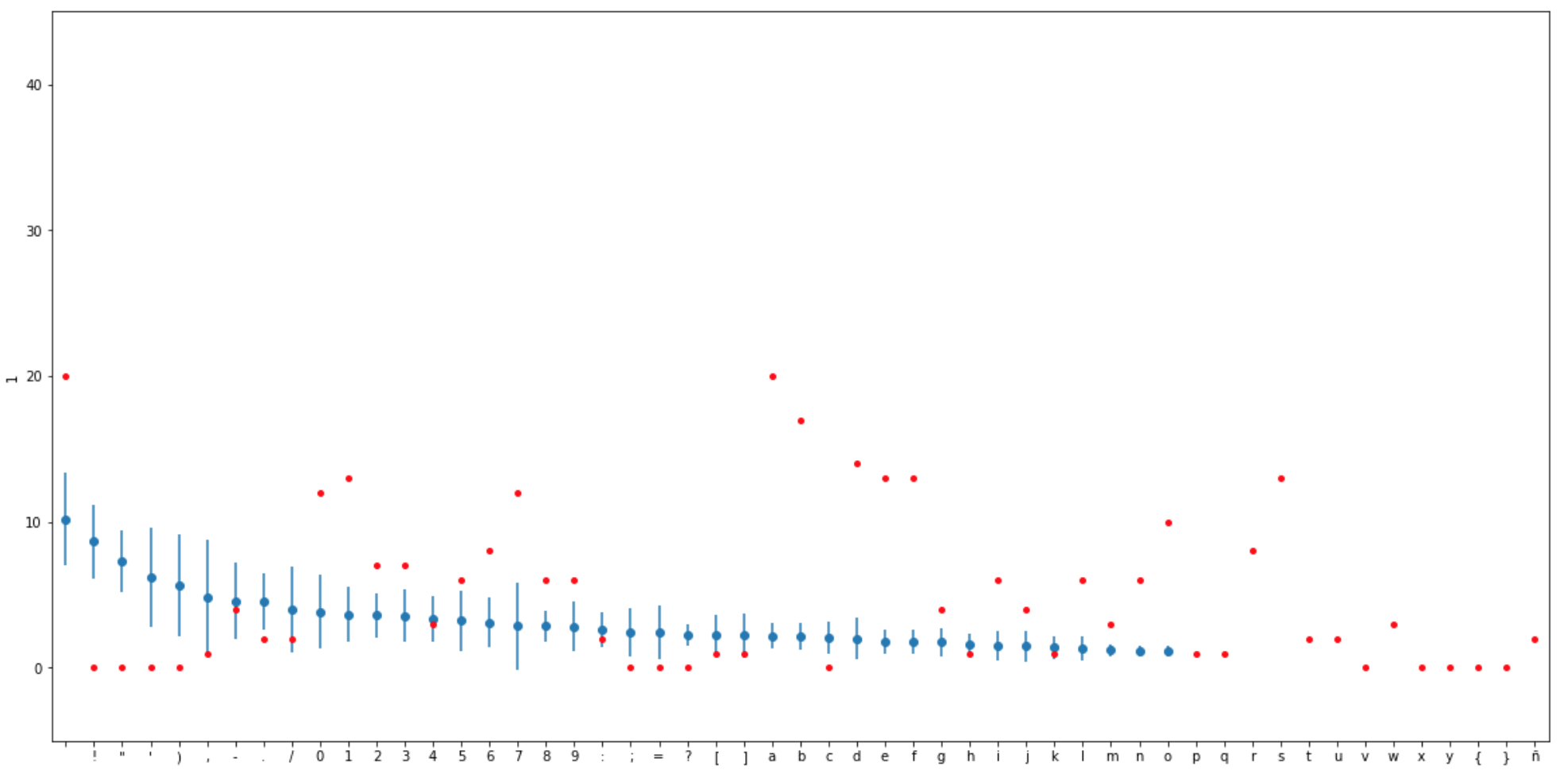
                            Tarkin implements a pipelined models strategy. The first step is training a character frequency model with a messages sample, then apply it to the content of testing/fresh incoming messages:

                            Character Frequency Scoring

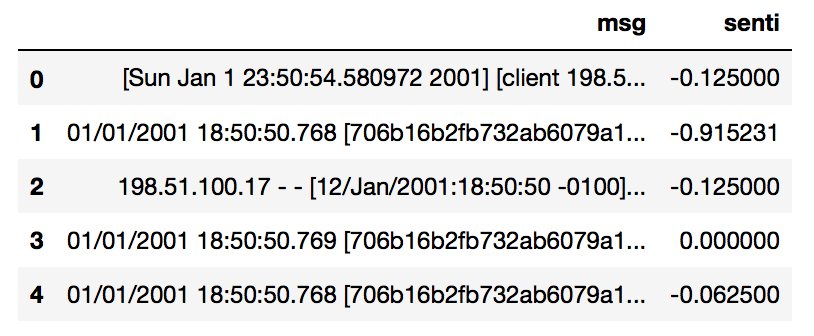
                            Then, adds sentiment analysis on top of that to show only messages with an overall negative meaning:

                            Sentiment Analysis Scoring

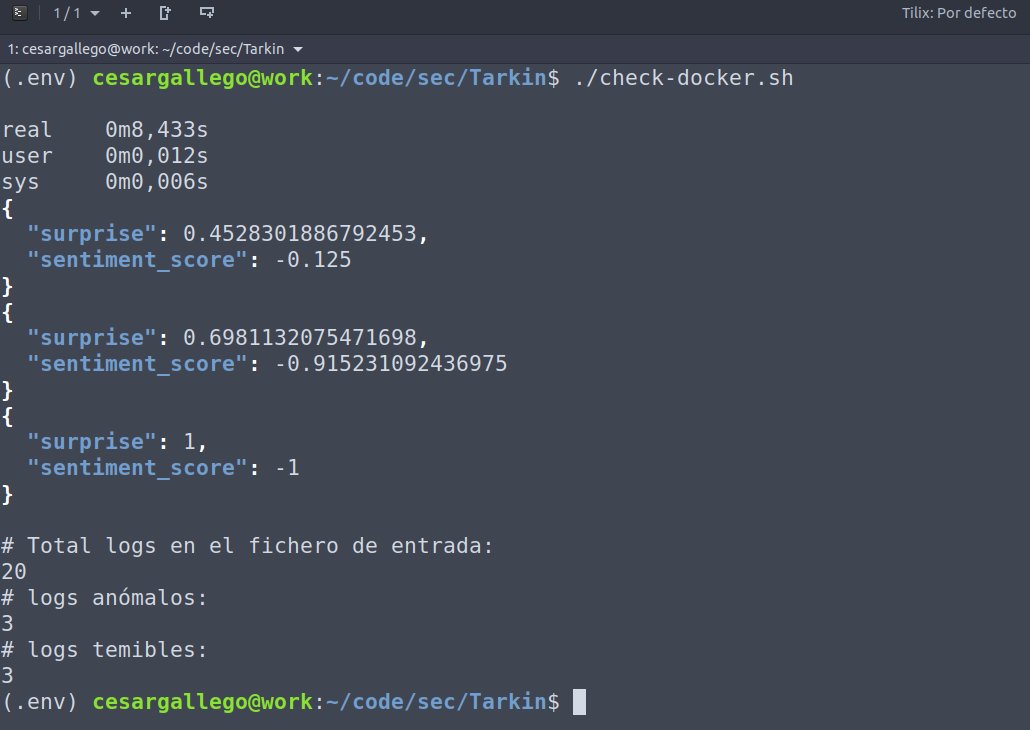
                            The resulting output is an indicator of the “fear” perceived in each message by the system, which is used to filter out the ones below a threshold set by the model:

                            System Output

                            Requirements

                            You need Python 3.6.x or later to run Tarkin. You can have multiple Python versions (2.x and 3.x) installed on the same system without problems.

                            In Ubuntu, Mint and Debian you can install Python 3 like this:

                            $ sudo apt-get install python3 python3-pip
                            

                            In OS X you can install Python using Brew like this:

                            $ brew install python3
                            

                            For other Linux flavors and Windows, packages are available at

                            http://www.python.org/getit/

                            To run the project in your python3 environment, you will need to install the dependencies in the requirements.txt file, and it’s highly recommended to create a separate virtual env, see below. Execute the following n a terminal window:

                            $ cd security-anomales-logs-data
                            $ pip install -r requirements.txt
                            

                            Then, you will need to run the following command:

                            $ python -m spacy download en
                            

                            Working with virtualenv

                            If you are using virtualenv, make sure you are running a python3 environment. Installing via pip3 in a v2 environment will not configure the environment to run installed modules from the command line.

                            $ python3 -m pip install -U virtualenv
                            $ python3 -m virtualenv env
                            $ source ./env/bin/activate  # Enter into VirtualEnv
                            

                            Quick start

                            There are several shell scripts available from the top level directory of the project:

                            • build.sh: Initializes the environment creating the necessary folders and building the docker images.

                            The project can be run in your own machine and python installation. You will first need to run the training script, then you can execute check.sh or check-demo.sh to analyze files configured in the same script or quoted sentences passed as command line parameters, respectively.

                            • train.sh: Starts the training of the letter frequency model, producing a letterspace.pkl binary file.
                            • check.sh: Evaluates the infrequency and applies sentiment analysis to the logs of the file configured in the script.
                            • check-demo.sh: Useful for demo purposes; evaluates the infrequency and applies sentiment analysis to a quoted sentence received as a script parameter. NOTICE: unlike check.sh, this script returns an evaluation result even if the sentiment score value is above 0.

                            You can also run the dockerized version of the project, which is launched using the following equivalent shell scripts:

                            • train-docker.sh
                            • check-docker.sh
                            • check-demo-docker.sh

                            Notebooks

                            The project includes a notebook to illustrate how the fear indicator is calculated. Before being able to run it, you’ll need to execute the following commands from your virtual env:

                            $ python3 -m pip install jupyter seaborn matplotlib
                            $ jupyter notebook
                            

                            Then navigate on your browser to Tarkin/notebooks from the Jupyter Home tree and open the file Log Mining.ipynb.

                            In case you experience an error running the notebook cells, make sure you executed the ./build.sh script that sets up the project by building the docker images and downloading the default lexicon dictionary, which is used by the notebook, or do it again if unsure.

                            Contributing

                            Feedback, ideas and contributions are welcome. For more details, please see the CONTRIBUTING.md file.

                            License

                            This project is distributed under the Apache License

                            Visit original content creator repository
                          • bikesharing

                            CitiBike Des Moines Proposal

                            Overview

                            Last summer I was fortunate enough to take the trip of a lifetime with one of my work partners. Normally I’m a “hop-on, hop-off” trolley kind of tourist. For this trip, my friend and I wanted to find a healthier option that would allow us more freedome for sightseeing. We decided to use CitiBike, and we loved it so much we want to bring it back to Des Moines. We believe that CitiBike can lead to a heathier Des Monies overall by reducing emissions, increasing opportunities to breathe fresh air, and helping everyone close their Activity ring. We used data from New York City in August to create some visualizations that will help us communicate with our investors.

                            Results

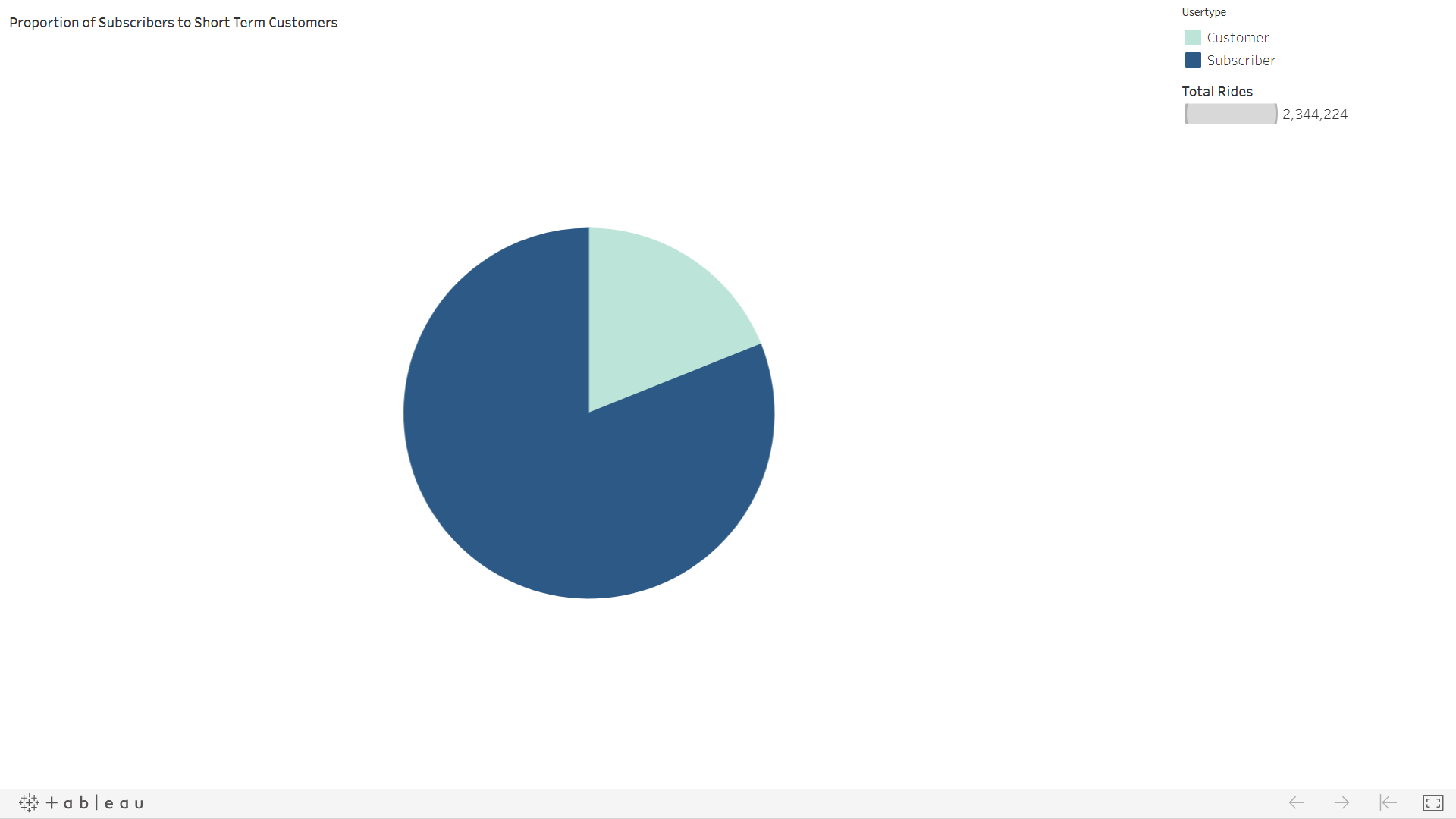
                            CitiBike customers took a total of 2,344,224 trips in the month of August. Let’s see what the data can tell us about what kind of customer uses CitiBike, and if it would be a good fit for Des Moines.

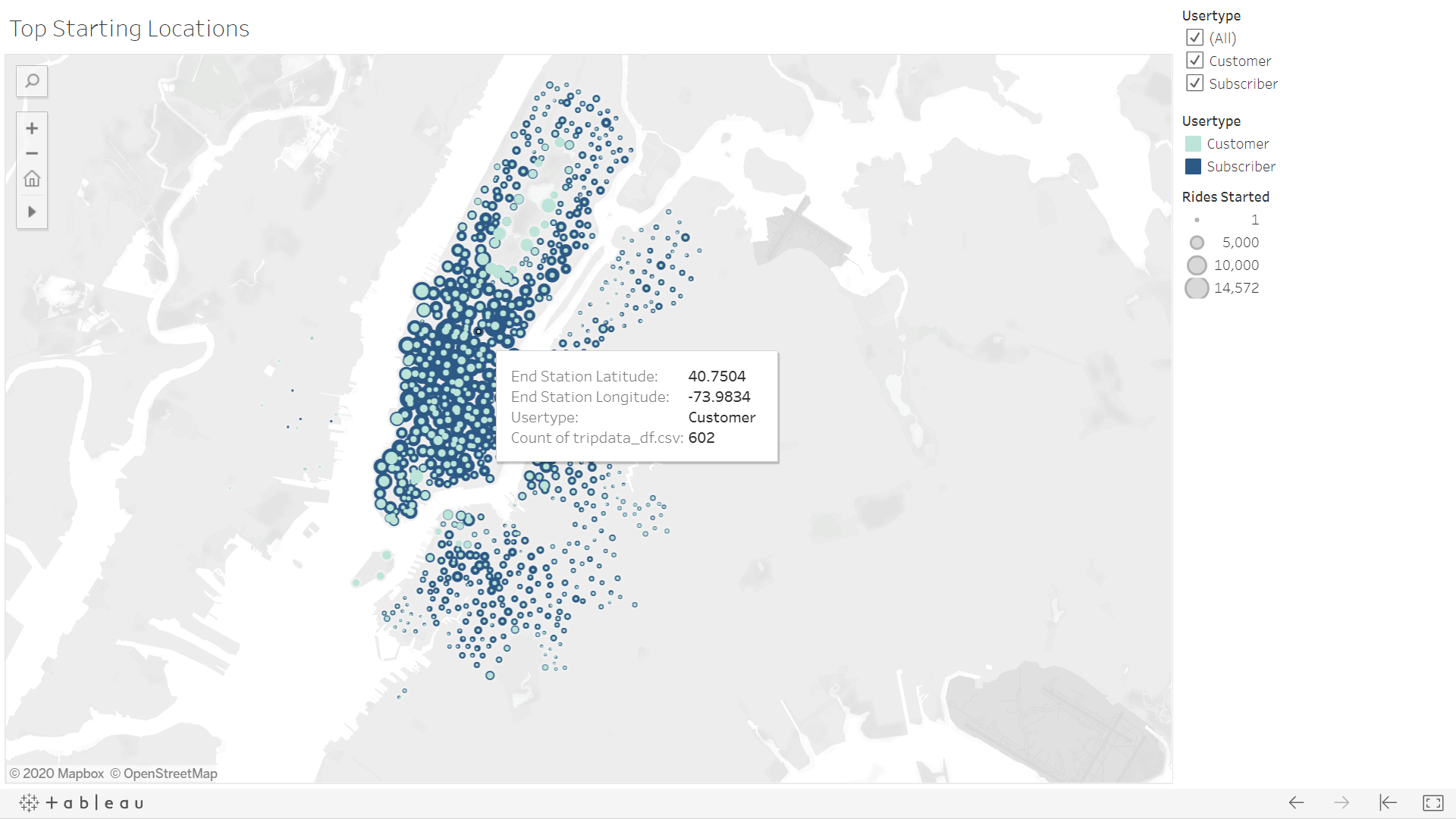
                            Starting Locations Here we can see that most trips begin in the downtown area. This begs the question, “Are the majority of riders tourists or commuters?” The filter on this map will help us compare, but we can also look at a little more information about the trips people are taking.

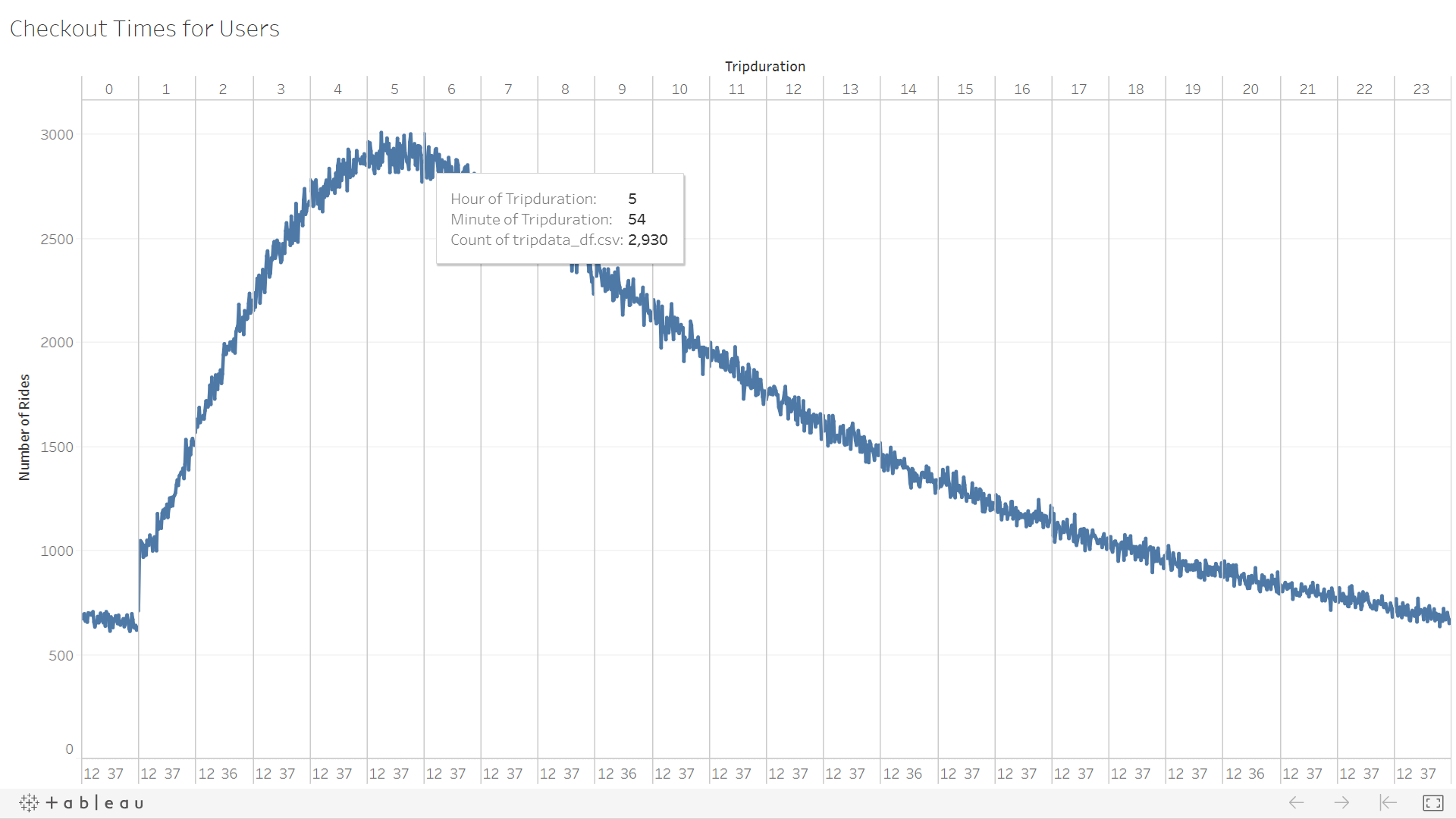
                            Trip Duration We can see on this line chart that most rides last between three and six hours. I wonder if these users are taking a long, scenic ride like my partner and I did. Maybe they are riders who commuted to work, but reserved the bike for the ride home. Let’s see what else we can learn.

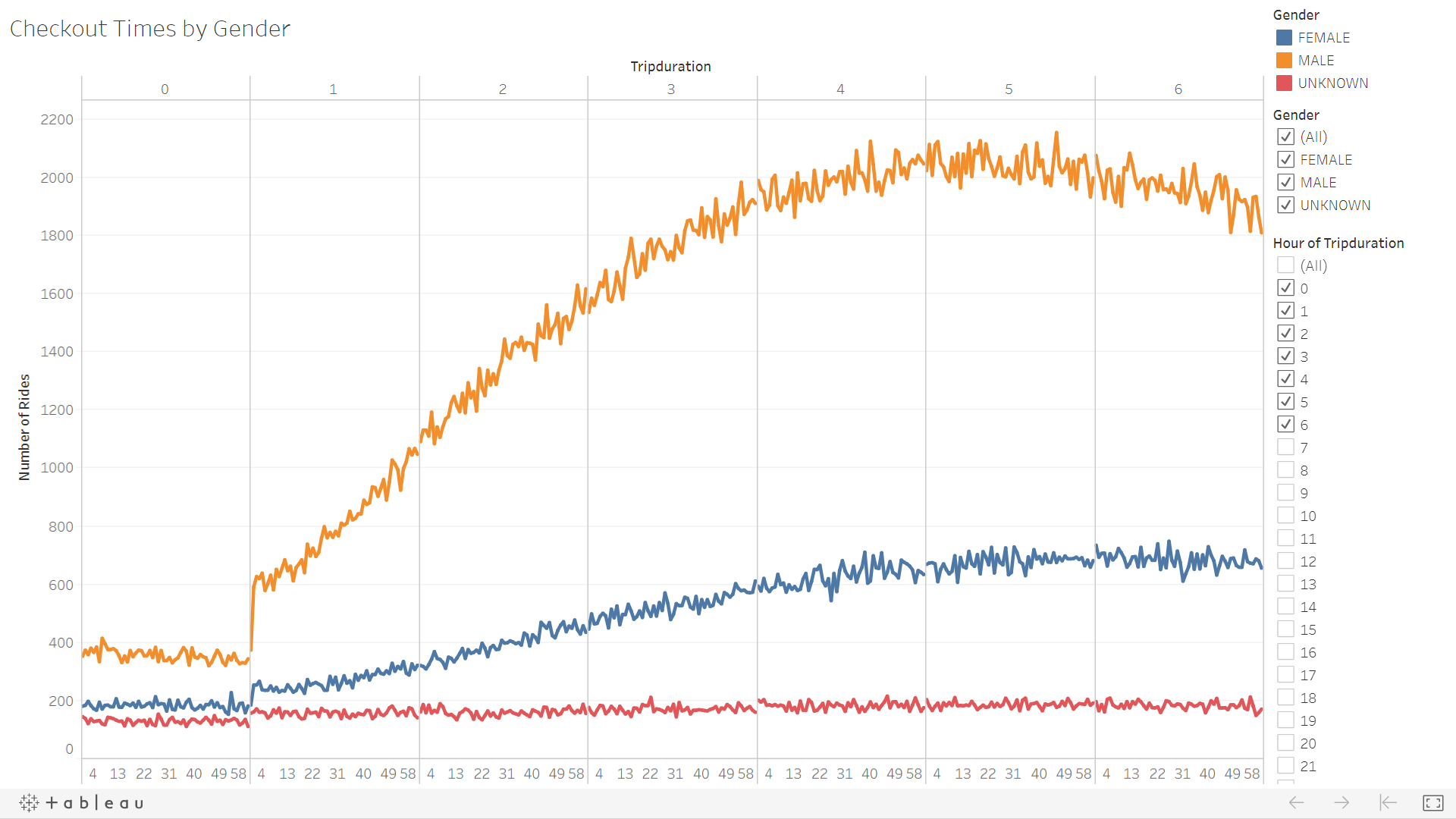
                            Gender Duration Wow! When we breakdown those trips by the gender of the rider, we can see that most customers are males. We still aren’t sure if these guys are saving the environment on their way to work, or cruising around the city taking in the sights.

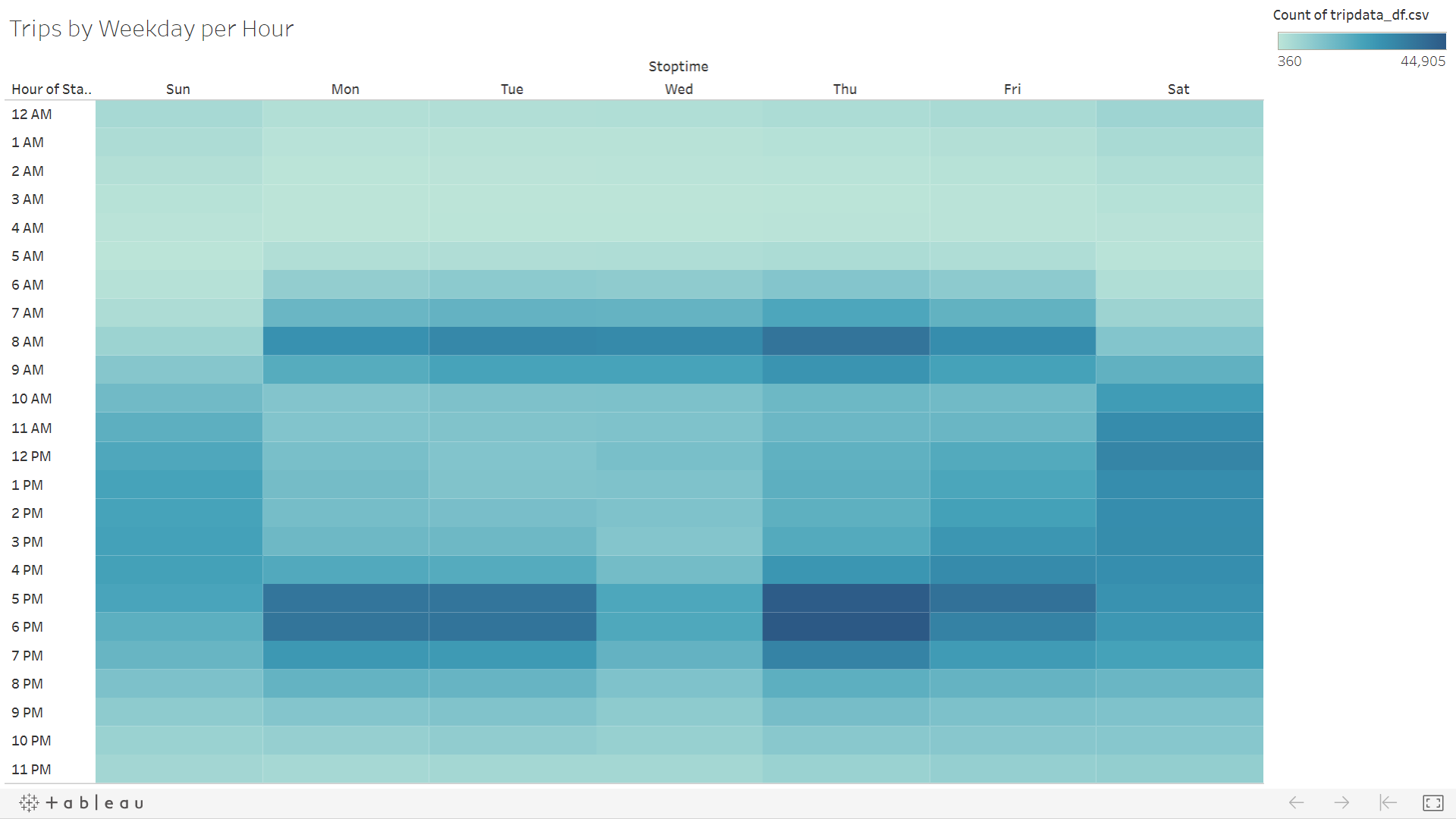
                            Checkout Times This heat map shows that most trips begin 8AM-9AM and 5PM-7PM on weekdays. There is some moderate afternoon acitivity on the weekends.

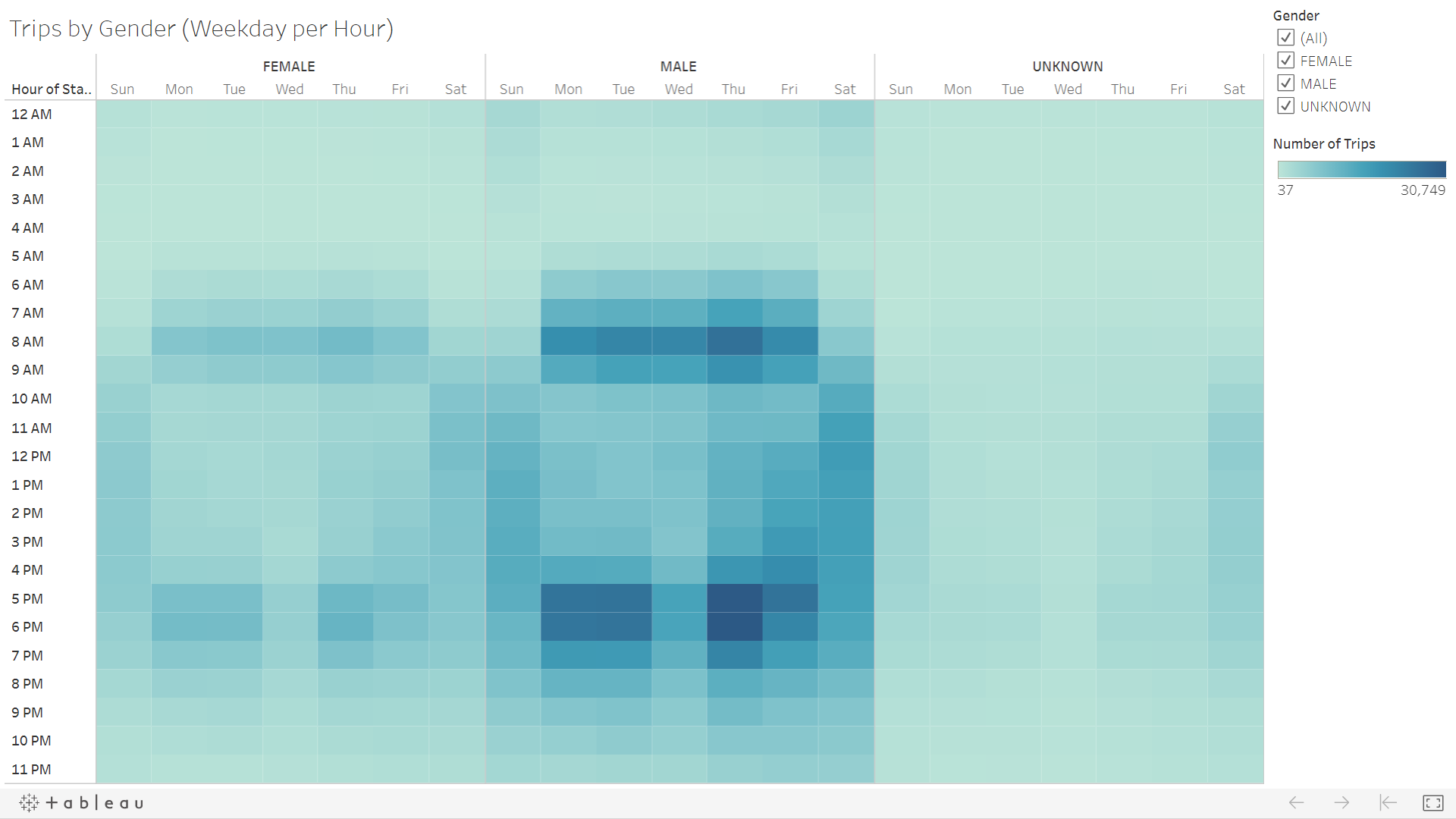
                            Gender Times Drilling down to look at when each gender begins their trip, it appears Rush Hours are still the busiest regardelss of gender. It also confirms that males are the majority of riders.

                            Gender Weekday When we split the heat map between Short Term Customers and Subscribers, we can see that the majority of rides are taken by male subscribers on any day of the week.

                            User Types This pie chart shows the proportion of Subscribers to Short Term Customers. Overwhelmingly, the CitiBike customer is a subscriber.

                            Analysis

                            The above visualizations and the Tableau Story I’ve created tell us a lot about what kind of person uses CitiBikes. Based on the data we have, male subscribers (most likely on their work commute) are the heaviest users of CitiBike. This could work to keep Des Moines clean, green, and healthy. More information would be helpful to determine the cost of maintaining the bikes. It would be helpful to compare starting and ending locations of each individual bike trip. It would help us know if most trips are short, one-way rides or if the user is riding round-trip and possibly not putting as many miles on the bike. Number of rides by age would be helpful to know as well. Perhaps the bikes are being used by college students and future executives alike!

                            Visit original content creator repository
                          • horsin-around-in-the-barn


                            Top

                            horsin-around-in-the-barn

                            An archive of the website I made for my parents AirB&B business.


                            README Index

                            00.0 – Title

                            01.0 – README Index

                            02.0 – About

                            03.0 – Project Wiki

                            04.0 – Rental

                            05.0 – Languages

                            05.1 – Human spoken languages

                            05.2 – Computer languages

                            06.0 – Editions

                            06.1 – Google Sites edition

                            06.2 – HTML5 edition

                            07.0 – Pet streaming

                            08.0 – GitHub issues

                            09.0 – Version history

                            10.0 – Contributers

                            11.0 – Contributing

                            12.0 – README info

                            13.0 – Footer


                            About

                            See above


                            Project Wiki

                            Click/tap here to view this projects Wiki


                            Rental

                            If you want to visit us, you can find more info on either of the 2 sites we use for hosting:


                            Languages

                            This is a list of 2 lists of the languages currently used for this project:

                            Human spoken languages

                            Currently, this project is written in only 1 human spoken language, with no translations. This includes:

                            1. English (US)
                            1. No other human spoken languages are in use for this project.

                            Computer languages

                            This project is written in 4 different computer languages, that include:

                            1. HTML5
                            1. CSS3
                            1. Markdown
                            1. Plain Text
                            1. No other languages

                            That is the list of languages used on this project


                            Editions

                            This is a list of 2 lists of the editions of this website:

                            Google sites edition

                            The Google sites edition is the current live edition of the site, but it is incomplete. I am still trying to figure out how to get a digital copy of it.

                            You can find it here.

                            HTML5 edition

                            The HTML5 edition is the version I created from scratch, so that I could have more functional, and control… and a digital copy.

                            Both versions have been developed near the same amount, this version isn’t complete as well.


                            Pet streaming

                            Pet streaming is a feature I am trying to figure out how to add, it is an extra option where pets kept in the stall can be live streamed to the website, so that you can check on them while you are away, and after your visit ends, you can choose to download the videos of the stream.

                            This feature is not very developed at the moment, and does not work.


                            GitHub issues

                            This is a list of the current GitHub issues for this project:

                            #1 [https://github.com/seanpm2001/horsin-around-in-the-barn/issues/1/](3 files couldn’t be uploaded)

                            #2 [https://github.com/seanpm2001/horsin-around-in-the-barn/issues/2/](Google sites edition can’t be imported)

                            #3 [https://github.com/seanpm2001/horsin-around-in-the-barn/issues/](No other issues, as of Wednesday, July 8th 2020 at 5:15 pm)


                            Version history

                            Version 1.0a – GitHub release 1 – 33 commits (Released: Wednesday, July 8th 2020 at 4:56 pm)

                            Version 1.0b – GitHub release 2 – 42 commits (Released: Wednesday, July 8th 2020 at 5:00 pm)

                            More versions coming soon


                            Contributers

                            Currently, I am the only contributer, but if you follow ther CONTRIBUTING rules, you can contribute as well.

                            1. seanpm2001 – 43 commits (As of Wednesday, July 8th 2020 at 5:15 pm)

                            2. No other contributers at the moment


                            Contributing

                            Please abide by the contributing rules for this project. They are listed here.


                            README info

                            File type: Markdown (*.md)

                            Line count (including blank lines): 182

                            File version: 2 (Wednesday, July 8th 2020 at 5:15 pm)


                            End of README file

                            ( Back to top | Exit )


                            Visit original content creator repository

                          • webchat-golang-socketio

                            webchat-golang-socket.io

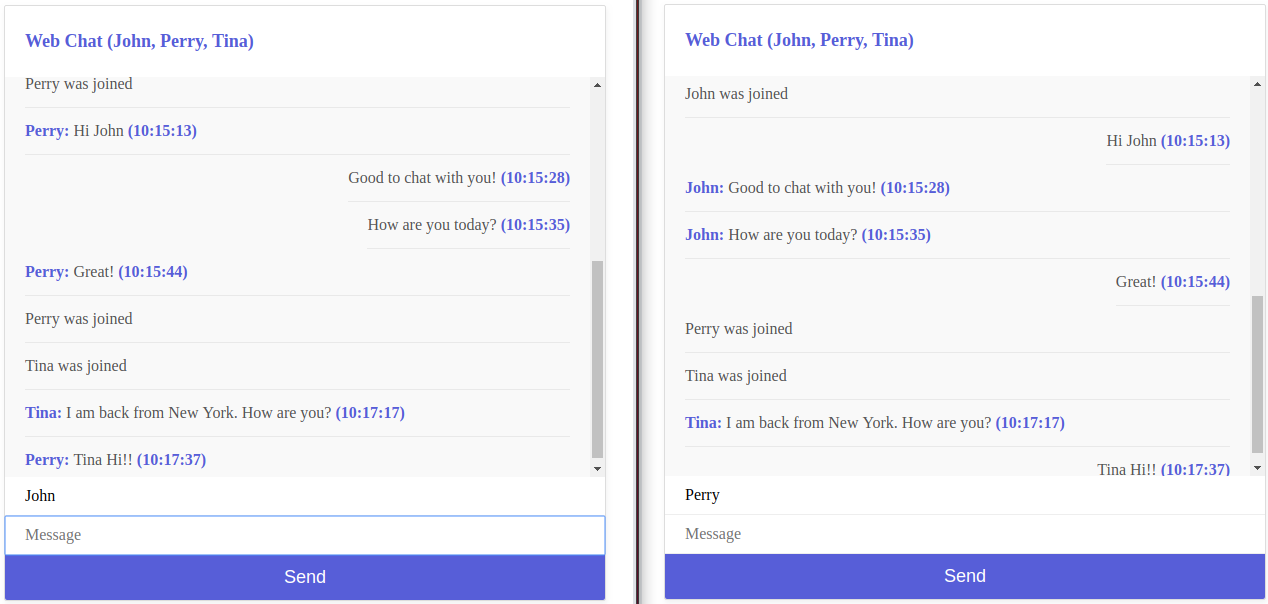
                            It shows a chat application in which socket.io is used to connect server and client.
                            Also, It supports 1-to-1 and groupchat using channel based communication.
                            In this project, PUBSUB structure was deployed to support Say, Join and Leave.

                            The server has a strangth to support massive traffics where the number of members is huge in a chatroom.
                            It is different with mobile text application since delivery and display notifications are not required since all members basically show a chatroom together as well as Slack.

                            RUN

                            $ go get github.com/nkovacs/go-socket.io 
                            $ go run main.go

                            Docker Build

                            $ docker build -t webchat-golang:v1 .

                            Result

                            • socket.io provide stable connection between server and client

                            • Participant lists are listed on the top

                            • User name is updated automatically without duplication

                            image

                            Data Structure

                            Event

                            type Event struct {
                            	EvtType   string
                            	User      string
                            	Timestamp int
                            	Text      string
                            }

                            Subscription

                            type Subscription struct {
                            	Archive []Event
                            	New     <-chan Event
                            }

                            Message Data Structure

                            type Message struct {
                            	User      string
                            	Timestamp int
                            	Message   string
                            }

                            Chatroom Management

                            func Chatroom() {
                            	archive := list.New()
                            	subscribers := list.New() // participants
                            
                            	for {
                            		select {
                            		case c := <-subscribe:
                            			var events []Event
                            
                            			// If there are archived events
                            			for e := archive.Front(); e != nil; e = e.Next() {
                            				events = append(events, e.Value.(Event))
                            			}
                            
                            			subscriber := make(chan Event, 10)
                            			subscribers.PushBack(subscriber)
                            
                            			c <- Subscription{events, subscriber}
                            
                            		case event := <-publish:
                            			for e := subscribers.Front(); e != nil; e = e.Next() {
                            				subscriber := e.Value.(chan Event)
                            				subscriber <- event
                            			}
                            
                            			// at least 5 events were stored
                            			if archive.Len() >= 5 {
                            				archive.Remove(archive.Front())
                            			}
                            
                            			archive.PushBack(event)
                            
                            		case c := <-unsubscribe:
                            			for e := subscribers.Front(); e != nil; e = e.Next() {
                            				subscriber := e.Value.(chan Event)
                            
                            				if subscriber == c {
                            					subscribers.Remove(e)
                            					break
                            				}
                            			}
                            		}
                            	}
                            }

                            Channel Management

                            server.On("connection", func(so socketio.Socket) {
                            		log.D("connected... %v", so.Id())
                            
                            		newMessages := make(chan string)
                            
                            		s := Subscribe()
                            
                            		so.On("join", func(user string) {
                            			log.D("Join...%v (%v)", user, so.Id())
                            
                            			Join(user) // Join notification
                            			userMap[so.Id()] = user
                            
                            			// if there are archived events
                            			for _, event := range s.Archive {
                            				so.Emit("chat", event)
                            			}
                            		})
                            
                            		so.On("chat", func(msg string) {
                            			newMessages <- msg
                            		})
                            
                            		so.On("disconnection", func() {
                            			log.D("disconnected... %v", so.Id())
                            
                            			user := userMap[so.Id()]
                            			delete(userMap, so.Id())
                            
                            			Leave(user) // left notifcation
                            			s.Cancel()
                            
                            			// update participant lists
                            			str := getParticipantList(userMap)
                            			userStr = str
                            			log.D("Update Participantlist: %v", userStr)
                            			so.Emit("participant", userStr)
                            		})
                            
                            		go func() {
                            			for {
                            				select {
                            				case event := <-s.New: // send event to browser
                            					so.Emit("chat", event)
                            
                            					// update participant lists
                            					if event.EvtType == "join" || event.EvtType == "leave" {
                            						str := getParticipantList(userMap)
                            						userStr = str
                            						log.D("Update Participantlist: %v", userStr)
                            						so.Emit("participant", userStr)
                            					}
                            
                            				case msg := <-newMessages: // received message from browser
                            					var newMSG Message
                            					json.Unmarshal([]byte(msg), &newMSG)
                            
                            					Say(newMSG)
                            				}
                            			}
                            		}()
                            	})

                            Join

                            func Join(user string) {
                            	timestamp := time.Now().Unix()
                            	publish <- NewEvent("join", user, int(timestamp), "")
                            }

                            Say

                            func Join(user string) {
                            	timestamp := time.Now().Unix()
                            	publish <- NewEvent("join", user, int(timestamp), "")
                            }

                            Leave

                            func Leave(user string) {
                            	timestamp := time.Now().Unix()
                            	publish <- NewEvent("leave", user, int(timestamp), "")
                            }

                            Troubleshooting – CORS

                            In order to excape CORS, the header of Access-Control-Allow-Origin was appended as bellow.

                                http.HandleFunc("/socket.io/", func(w http.ResponseWriter, r *http.Request) {
                            		// origin to excape Cross-Origin Resource Sharing (CORS)
                            		if origin := r.Header.Get("Origin"); origin != "" {
                            			w.Header().Set("Access-Control-Allow-Origin", origin)
                            		}
                            		w.Header().Set("Access-Control-Allow-Credentials", "true")
                            
                            		server.ServeHTTP(w, r)
                            	})

                            Reference

                            https://github.com/socketio/socket.io

                            https://github.com/iamshaunjp/websockets-playlist

                            https://github.com/nkovacs/go-socket.io

                            https://github.com/pyrasis/golangbook/blob/master/Unit%2067/chat.go

                            Visit original content creator repository